How to Fix CrashLoopBackOff in Kubernetes (2026)
CrashLoopBackOff means a container keeps crashing and Kubernetes is waiting before it restarts again. A step-by-step diagnosis with the exact kubectl commands.
Key Takeaways
- CrashLoopBackOff is a status, not a root cause: it means a container has crashed repeatedly and the kubelet is now waiting before restarting it. The Kubernetes docs define the state as one where "the backoff delay mechanism is currently in effect for a given container that is in a crash loop."
- The wait grows on a fixed schedule. The kubelet "restarts them with an exponential backoff delay (10s, 20s, 40s, …), that is capped at 300 seconds (5 minutes)," per the pod lifecycle docs.
- A high Restart Count is the tell. The debug docs note "Restart Count tells you how many times the container has been restarted; this information can be useful for detecting crash loops."
- The crash log is the fastest path to the cause. When a container has already died, its logs are gone from the live view; retrieve them with
kubectl logs <pod> -c <container> --previous.- Most crash loops trace to one of five causes: a failing application process, a bad or missing config or secret, a failed liveness probe, an OOMKill, or a missing dependency at startup.
- The loop resets itself once the container is healthy. "Once a container has executed for 10 minutes without any problems, the kubelet resets the restart backoff timer for that container."
CrashLoopBackOff is a Kubernetes pod status that means a container started, crashed, and has been restarted enough times that the kubelet is now pausing between attempts with an increasing delay. It is a symptom the scheduler surfaces, not a diagnosis, so fixing it means finding why the container exits and reading the crash log before the next restart hides it.
What does CrashLoopBackOff mean in Kubernetes?
It means a container in the pod keeps terminating shortly after it starts, and the kubelet has begun spacing out the restarts. The Kubernetes pod lifecycle documentation describes the state directly: it "indicates that the backoff delay mechanism is currently in effect for a given container that is in a crash loop." The container is not stuck; it is being restarted, failing again, and being held back a little longer each time.
The delay is deterministic. Per the same page, when containers keep failing "the kubelet restarts them with an exponential backoff delay (10s, 20s, 40s, …), that is capped at 300 seconds (5 minutes)." That cap is why a crash-looping pod eventually only retries once every five minutes, and why an obviously broken pod can sit in CrashLoopBackOff for a long time without a human touching it. The counter is not permanent: "Once a container has executed for 10 minutes without any problems, the kubelet resets the restart backoff timer for that container." So a fix is confirmed when the pod runs clean past that ten-minute mark.
How do I diagnose a CrashLoopBackOff pod?
Start by confirming the status and the restart count, then read the crash log, then read the pod's events. Three commands cover almost every case.
First, list the pod and check how many times it has restarted:
kubectl get pods
A climbing restart count on a pod in CrashLoopBackOff is the confirmation. The debug-running-pod guide notes that "Restart Count tells you how many times the container has been restarted; this information can be useful for detecting crash loops in containers that are configured with a restart policy of Always."
Second, read the log from the instance that already died. The live kubectl logs output is from the current container, which may be too young to show the error, so ask for the previous one. The Kubernetes docs give the exact form: "If your container has previously crashed, you can access the previous container's crash log with:"
kubectl logs <pod-name> -c <container-name> --previous
Third, read the pod's own events and last state, which surface OOMKills, probe failures, and image or mount errors that never reach the application log:
kubectl describe pod <pod-name>
What are the most common causes of CrashLoopBackOff?
The status is one symptom with several causes. These five account for the large majority of crash loops, and each has a distinct signature in the three commands above.
| Cause | Where it shows up | Typical fix |
|---|---|---|
| Application error on startup | Stack trace or panic in --previous logs | Fix the code path or the input that triggers the exit |
| Bad or missing config / secret | Log shows a missing env var, key, or file | Correct the ConfigMap, Secret, or mount |
| Failing liveness probe | describe shows the probe killing the container | Fix the probe target or raise initialDelaySeconds |
| Out of memory (OOMKilled) | describe shows Reason: OOMKilled, exit code 137 | Raise the memory limit or fix the leak |
| Missing startup dependency | Log shows a connection refused to a DB or service | Fix ordering, readiness of the dependency, or retries |
A liveness probe deserves special attention because it can turn a healthy container into a crash loop on its own. If the probe points at a path or port the app does not serve, or fires before the app finishes starting, the kubelet keeps killing and restarting a process that would otherwise run. The Kubernetes pod lifecycle docs are explicit about the mechanism: "If a container fails its liveness probe more times than the configured tolerance, the kubelet restarts that container." The documented fix for a slow-starting app is a startup probe, which the probe-configuration guide frames as a way to "Protect slow starting containers with startup probes."
How do I fix CrashLoopBackOff step by step?
Work from symptom to cause to fix, in that order, and confirm the pod stays up past the ten-minute reset.
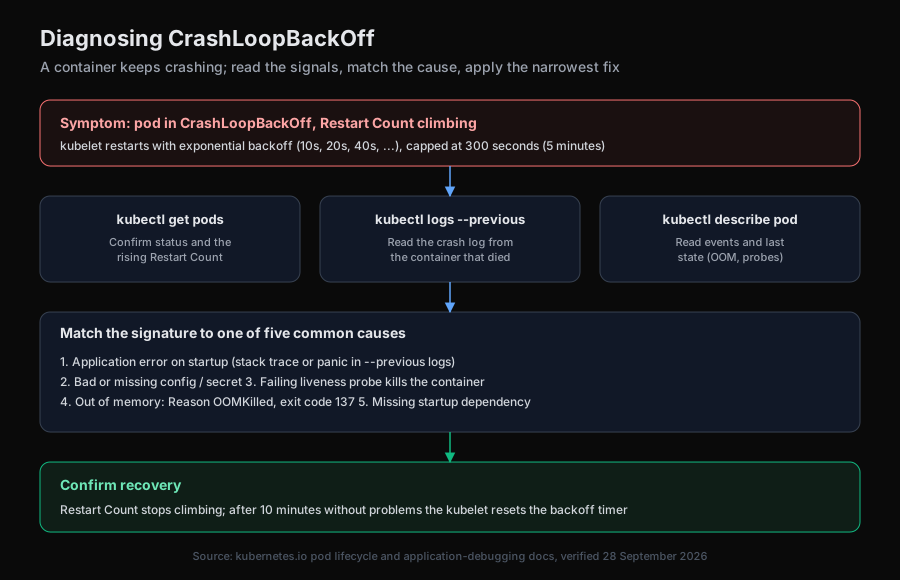
The sequence is the same regardless of cause: read the restart count, read the previous container's log, read the pod events, match the signature to a cause, apply the narrowest fix, and watch the restart count stop climbing. The backoff itself is working as designed; it is buying time, not causing the failure.
How does an AI SRE help with CrashLoopBackOff?
An investigation agent runs the same read-only sequence a human would, then correlates it with what changed. The bottleneck in a crash loop is rarely running the commands; it is connecting the crash log to the deploy, config change, or resource edit that introduced it, especially when several pods fail at once. Aurora is an open-source AI SRE that reads pod status, previous-container logs, and events through Kubernetes tools, then correlates them with recent changes rather than acting blind.
Aurora runs a single investigation agent by default, with an opt-in multi-agent orchestrator, and its powerful tools sit behind an explicit allowlist. It supports sandboxed Kubernetes execution when ENABLE_POD_ISOLATION is set. Any fix is proposed as a pull request a human merges, never an automatic change to a running cluster, which matters when the pod in question is already unhealthy. For the safety model behind reading a live cluster, see AI agent kubectl safety; for the broader workflow, see AI-powered incident investigation and the root cause analysis guide for SREs.
The summary
CrashLoopBackOff is the kubelet telling you a container keeps dying, then pacing the restarts on a fixed backoff that caps at five minutes and resets after ten clean minutes. The fix is always the same shape: confirm the restart count with kubectl get pods, read the crash log with kubectl logs --previous, read events with kubectl describe pod, and match the signature to one of five common causes. The status is a pointer to the problem, not the problem itself.
Try Aurora
- Start free: aurora-ai.net (hosted, no infrastructure to run)
- GitHub: github.com/Arvo-AI/aurora
- Book a demo: cal.com/arvo-ai/demo
- See it on an incident: Aurora root cause analysis
To self-host and point Aurora at your own cluster:
git clone https://github.com/Arvo-AI/aurora
Sourcing note. The CrashLoopBackOff definition, the exponential backoff delay "(10s, 20s, 40s, …)" capped at "300 seconds (5 minutes)," and the ten-minute reset are quoted from the Kubernetes pod lifecycle documentation, verified 28 September 2026. The Restart Count wording and the
kubectl logs --previouscommand are quoted from the Kubernetes application-debugging docs, and the liveness-probe behavior from the probe-configuration guide, both verified the same day. Aurora's defaults are described from its open-source repository.