How to Fix ImagePullBackOff in Kubernetes (2026)
ImagePullBackOff means Kubernetes could not pull the container image and is waiting longer between tries, up to 5 minutes. The checks from the official docs.
Key Takeaways
- ImagePullBackOff means the container could not start because Kubernetes could not pull its image. The container images docs name two examples: "invalid image name, or pulling from a private registry without
imagePullSecret."- BackOff means Kubernetes keeps trying, with a longer wait each time. "Kubernetes raises the delay between each attempt until it reaches a compiled-in limit, which is 300 seconds (5 minutes)."
- This is not a crash. The container never starts, so
kubectl logshas nothing to show. The debug guide says to start withkubectl describe pods.- The debug guide lists three checks: the image name is correct, the image was pushed, and you can pull the image yourself.
- A missing registry host means Docker Hub. "If you don't specify a registry hostname, Kubernetes assumes that you mean the Docker public registry." Omitting the tag means
latest.- A private registry needs a pull secret in the same namespace. "All
imagePullSecretsmust be Secrets that exist in the same Namespace as the Pod," of typekubernetes.io/dockercfgorkubernetes.io/dockerconfigjson.
ImagePullBackOff is a Kubernetes waiting status: the kubelet could not pull the container image, and it is spacing out further pull attempts, up to five minutes apart. The pod is scheduled. The container has not run. Fixing it means reading the pull error in the pod events and correcting the name, the registry, or the credentials. It is a different problem from CrashLoopBackOff and from OOMKilled, both of which require the container to have started.
What does ImagePullBackOff mean?
The container images page defines it: "The status ImagePullBackOff means that a container could not start because Kubernetes could not pull a container image (for reasons such as invalid image name, or pulling from a private registry without imagePullSecret). The BackOff part indicates that Kubernetes will keep trying to pull the image, with an increasing back-off delay."
The cap is fixed: "Kubernetes raises the delay between each attempt until it reaches a compiled-in limit, which is 300 seconds (5 minutes)." Leaving the pod alone does not fix the pull. It only waits longer between the same failure.
The debug pods guide describes the situation as a pod stuck Waiting. "The most common cause of Waiting pods is a failure to pull the image."
How do I see why the image pull failed?
Describe the pod. The events include the image name and the pull error. Logs will not, because the container did not start.
kubectl describe pods <pod-name>
That is the command the debug guide gives as the first step: "Check the current state of the Pod and recent events." Then work through the three checks on that same page:
- Make sure that you have the name of the image correct.
- Have you pushed the image to the registry?
- Try to manually pull the image to see if the image can be pulled.
While you read the name, apply the defaults Kubernetes fills in. "If you don't specify a registry hostname, Kubernetes assumes that you mean the Docker public registry." "If you don't specify a tag, Kubernetes assumes you mean the tag latest."
What are the common causes of ImagePullBackOff?
The events usually point at one of these. Each one is a pull failure, not an application failure.
| Cause | What the docs say | Typical fix |
|---|---|---|
| Wrong image name or tag | Debug guide: make sure the image name is correct | Correct the image field to a name that exists |
| Image was never pushed | Debug guide: have you pushed the image to the registry? | Push the tag the pod references |
| Private registry, no pull secret | ImagePullBackOff examples include "pulling from a private registry without imagePullSecret" | Add imagePullSecrets in the same namespace as the pod |
| Secret in the wrong namespace, or wrong type | "All imagePullSecrets must be Secrets that exist in the same Namespace as the Pod" and must be type kubernetes.io/dockercfg or kubernetes.io/dockerconfigjson | Move or retype the Secret, then reference it from the pod |
imagePullPolicy: Never and the image is not on the node | "The kubelet does not try fetching the image. ... otherwise, startup fails." | Pre-pull the image, or change the policy so the kubelet can pull |
How does imagePullPolicy change the pull?
imagePullPolicy and the image tag decide whether the kubelet asks the runtime to pull. From the images docs:
| Policy | Behavior |
|---|---|
IfNotPresent | "the image is pulled only if it is not already present locally." |
Always | "every time the kubelet launches a container, the kubelet requests the container runtime to pull the image." |
Never | "the kubelet does not try fetching the image. If the image is somehow already present locally, the kubelet attempts to start the container; otherwise, startup fails." |
If you omit the field, Kubernetes sets it for you:
- Digest, and no policy:
IfNotPresent. - Tag
:latest, or no tag at all:Always. - Any other tag:
IfNotPresent.
The docs also say to avoid :latest in production, "as it is harder to track which version of the image is running and more difficult to roll back properly." A digest pins the image. A moved tag does not.
One trap: "The value of imagePullPolicy of the container is always set when the object is first created, and is not updated if the image's tag or digest later changes." Changing a Deployment's tag to :latest later does not flip the policy to Always. You have to set the policy yourself.
How do I fix ImagePullBackOff step by step?
Read the event, match it to one cause, and change that one thing. Pulling again without a change just waits out the backoff.
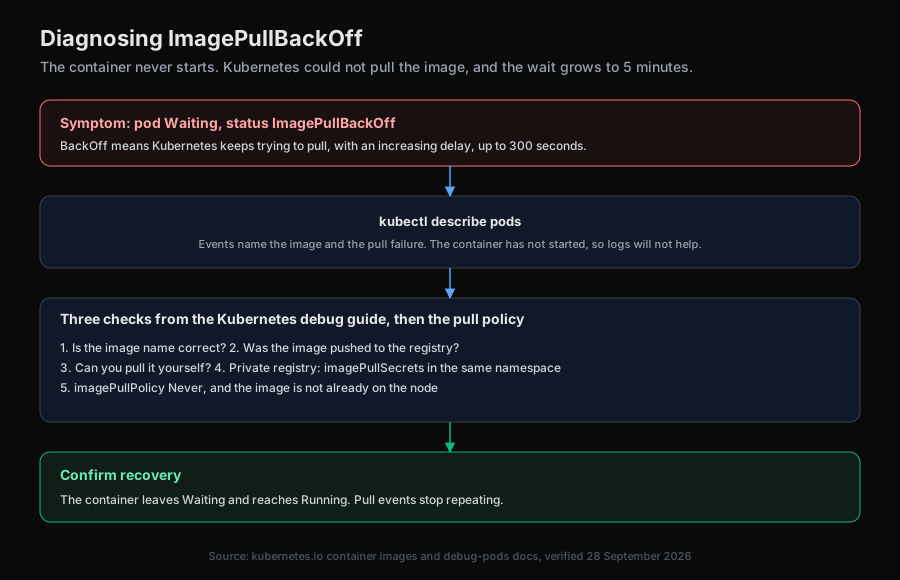
After the fix, the container should leave Waiting. If the events still report the same pull error, the name, the secret namespace, or the policy did not actually change on the pod that is failing.
How does an AI SRE help with ImagePullBackOff?
The failure is in the pod events, not in the application. The slow part is noticing that a rollout is waiting on a pull, and telling a bad name apart from a missing secret or a Never policy. Aurora is an open-source AI SRE that reads pod status and events through Kubernetes tools, then correlates them with recent changes rather than acting blind.
Aurora runs a single investigation agent by default, with an opt-in multi-agent orchestrator, and its powerful tools sit behind an explicit allowlist. It supports sandboxed Kubernetes execution when ENABLE_POD_ISOLATION is set. Any fix is proposed as a pull request a human merges, never an automatic change to a running cluster. See AI agent kubectl safety and AI-powered incident investigation.
The summary
ImagePullBackOff means the image pull failed and Kubernetes is waiting longer between retries, up to five minutes. Describe the pod, then check the image name, whether it was pushed, and whether you can pull it. For a private registry, the pull secret has to be in the same namespace and be a docker config secret. The container has not started, so this is not a crash loop and it is not an OOM kill.
Try Aurora
- Start free: aurora-ai.net (hosted, no infrastructure to run)
- GitHub: github.com/Arvo-AI/aurora
- Book a demo: cal.com/arvo-ai/demo
- See it on an incident: Aurora root cause analysis
To self-host and point Aurora at your own cluster:
git clone https://github.com/Arvo-AI/aurora
Sourcing note. The ImagePullBackOff definition, the 300-second backoff cap, the image-name defaults, the
imagePullPolicyvalues and defaults, theimagePullSecretsnamespace and type rules, and the warning about:latestare quoted from the Kubernetes container images documentation, verified 28 September 2026. The describe command and the three pull checks are quoted from the Kubernetes debug pods guide, verified the same day. Aurora's defaults are described from its open-source repository.