How to Fix OOMKilled in Kubernetes (2026)
OOMKilled means a container was terminated for using more memory than its limit. How to confirm exit code 137, and how to tell it apart from a Pending pod.
Key Takeaways
- OOMKilled means the container was terminated because it ran out of memory. The Kubernetes memory docs show the terminated state as
reason: OOMKilledwithexitCode: 137.- A container may use more memory than it requests, but not more than its limit. "A Container is guaranteed to have as much memory as it requests, but is not allowed to use more memory than its limit."
- Crossing the limit makes the container a candidate for termination. "If a Container allocates more memory than its limit, the Container becomes a candidate for termination. If the Container continues to consume memory beyond its limit, the Container is terminated."
- The kubelet restarts it if the container can be restarted. "If a terminated Container can be restarted, the kubelet restarts it, as with any other type of runtime failure." That restart loop is why OOMKilled often shows up as CrashLoopBackOff.
- Pending is a different failure. A memory request larger than any node leaves the pod
PendingwithFailedSchedulingandInsufficient memory. The container never started, so it was not OOMKilled.- A container with no memory limit is easier for the node to kill. "A container with no resource limits will have a greater chance of being killed."
OOMKilled is the reason Kubernetes records when it terminates a container for using more memory than its limit. The pod may then sit in CrashLoopBackOff, because the kubelet restarts a restartable container the same way it restarts any other runtime failure. The fix starts by confirming reason: OOMKilled and exitCode: 137, then deciding whether the limit is too low or the process is allocating without bound.
What does OOMKilled mean in Kubernetes?
It means the container was killed for memory, not that the scheduler refused to place the pod. The assign memory resources page states the rule directly: "A Container is guaranteed to have as much memory as it requests, but is not allowed to use more memory than its limit."
The same page describes what happens past the limit: "If a Container allocates more memory than its limit, the Container becomes a candidate for termination. If the Container continues to consume memory beyond its limit, the Container is terminated. If a terminated Container can be restarted, the kubelet restarts it, as with any other type of runtime failure."
The documented signature in kubectl get pod --output=yaml is under lastState.terminated:
reason: OOMKilled
exitCode: 137
kubectl describe nodes records the kill on the node as well. The docs show that event as "Warning OOMKilling Memory cgroup out of memory." kubectl describe pod shows the restart cycle as "Warning BackOff Back-off restarting failed container."
How do I confirm a container was OOMKilled?
Read the terminated state, then the node event. Do not treat a high restart count by itself as proof.
kubectl get pod <pod-name> --output=yaml
Look for reason: OOMKilled and exitCode: 137 on the container that already stopped. Then:
kubectl describe pod <pod-name>
kubectl describe nodes
describe pod shows the backoff warning. describe nodes shows the OOMKilling warning. If those fields are absent, the container exited for a different reason. The previous container log is still worth reading, but an OOM kill often leaves little application output, because the process is terminated rather than exiting on its own.
How is OOMKilled different from Pending?
A pod that cannot be scheduled never reaches OOMKilled. Scheduling uses requests, not limits. The docs are explicit: "Pod scheduling is based on requests. A Pod is scheduled to run on a Node only if the Node has enough available memory to satisfy the Pod's memory request." The pod request is "the sum of the memory requests for all the Containers in the Pod."
When that sum is larger than every node, kubectl get pod shows Pending, and kubectl describe pod shows FailedScheduling with Insufficient memory. Raise the request only if a node can actually hold it, or add capacity. That is not a memory-limit change.
| Status | What happened | Where it shows up |
|---|---|---|
| OOMKilled | The container ran, then exceeded its memory limit | reason: OOMKilled, exitCode: 137, node event OOMKilling |
| CrashLoopBackOff | The kubelet is waiting between restarts of a container that keeps dying | Restart count climbing, Back-off restarting failed container |
| Pending | The pod was never scheduled | FailedScheduling, Insufficient memory |
OOMKilled and CrashLoopBackOff often appear together. The kill is the cause. CrashLoopBackOff is the backoff wrapped around the restart. Steps for the backoff itself are in how to fix CrashLoopBackOff.
What are the common causes of OOMKilled?
The status has one mechanism and a few ways to arrive there.
| Cause | Where it shows up | Typical fix |
|---|---|---|
| Working set above the memory limit | OOMKilled while the process is otherwise healthy | Raise resources.limits.memory to cover the real working set |
| Unbounded allocation or a leak | Memory climbs until the same limit kills the container again | Fix the allocation. A higher limit only delays the next kill |
| No memory limit set | The container can use node memory, and the docs say it has "a greater chance of being killed" | Set a limit, or expect the node OOM killer to choose it |
| Memory request larger than any node | Pod stays Pending, not OOMKilled | Lower the request or add a node that can satisfy it |
Limits and requests are set per container with resources.limits.memory and resources.requests.memory. If you omit a limit, one of two things applies, per the same page: the container has no upper bound and can consume node memory, or a namespace LimitRange assigns a default limit.
How do I fix OOMKilled step by step?
Confirm the kill, separate it from Pending, then change the limit or the process. Do not raise the limit until reason: OOMKilled is actually there.
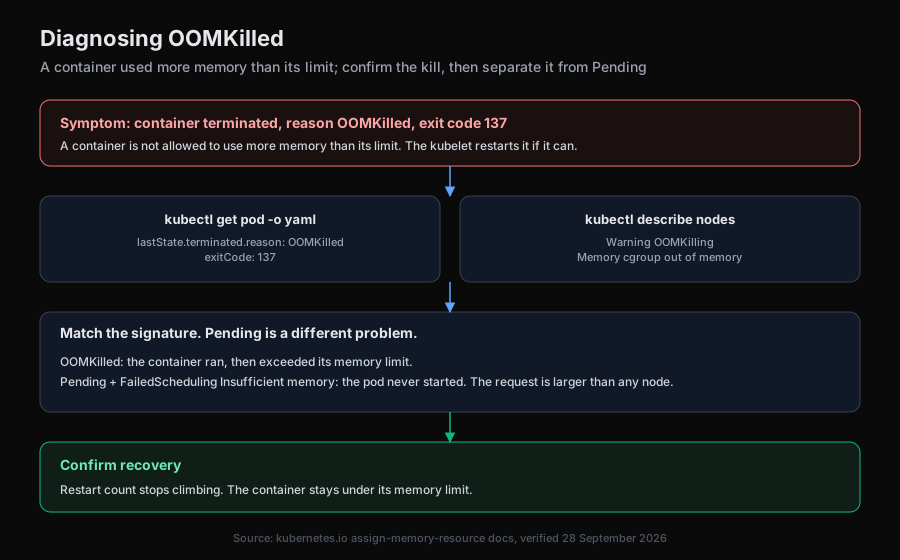
After the change, watch the restart count. A container that stays under its limit stops producing OOMKilled. A container that climbs to the new limit and dies again is leaking or allocating without a bound. The limit was not the bug.
How does an AI SRE help with OOMKilled?
The commands are short. The slow part is telling a limit that is simply too low apart from a leak, and telling both apart from a pod that is Pending because the request cannot be scheduled. Aurora is an open-source AI SRE that reads pod status and node events through Kubernetes tools, then correlates them with recent changes rather than acting blind.
Aurora runs a single investigation agent by default, with an opt-in multi-agent orchestrator, and its powerful tools sit behind an explicit allowlist. It supports sandboxed Kubernetes execution when ENABLE_POD_ISOLATION is set. Any fix is proposed as a pull request a human merges, never an automatic change to a running cluster. For the safety model, see AI agent kubectl safety. For the broader workflow, see AI-powered incident investigation.
The summary
OOMKilled means the container exceeded its memory limit and was terminated with exit code 137. Confirm it in the pod YAML and in the node's OOMKilling event. A Pending pod with Insufficient memory never started, so changing its limit will not schedule it. If the container is restarting, CrashLoopBackOff is the backoff around this kill, not a second root cause.
Try Aurora
- Start free: aurora-ai.net (hosted, no infrastructure to run)
- GitHub: github.com/Arvo-AI/aurora
- Book a demo: cal.com/arvo-ai/demo
- See it on an incident: Aurora root cause analysis
To self-host and point Aurora at your own cluster:
git clone https://github.com/Arvo-AI/aurora
Sourcing note. The memory guarantee, the termination rule for a container that exceeds its limit, the kubelet restart sentence,
reason: OOMKilledwithexitCode: 137, theOOMKillingandBackOffevents, the PendingFailedScheduling/Insufficient memorycase, and the note on containers with no limit are quoted from the Kubernetes page "Assign Memory Resources to Containers and Pods," verified 28 September 2026. Aurora's defaults are described from its open-source repository.